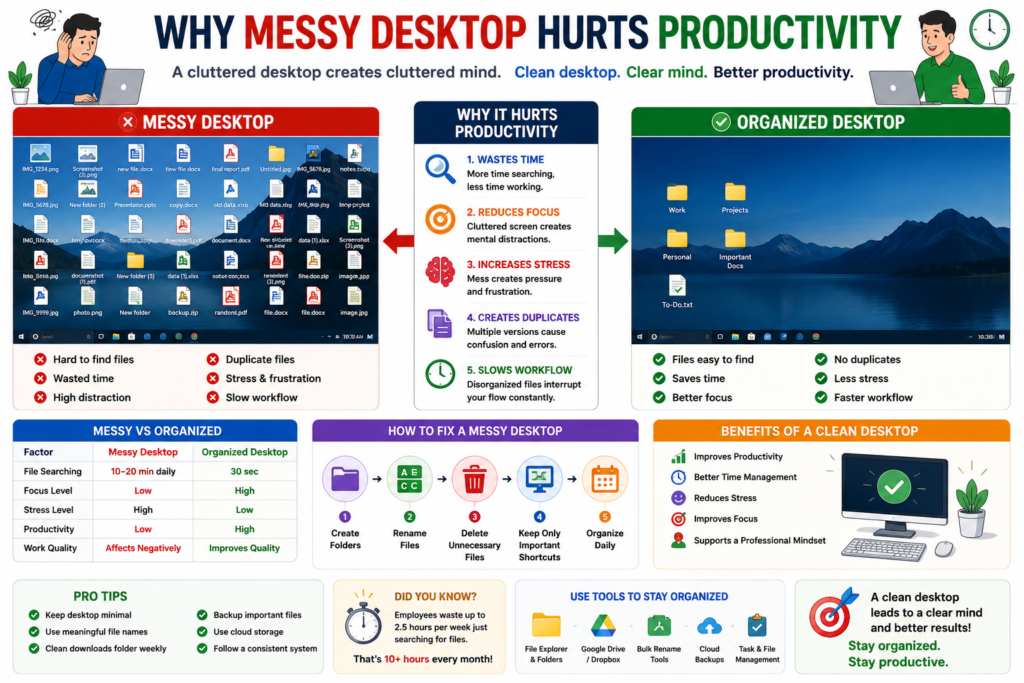
A messy computer desktop may look harmless, but it can seriously reduce productivity and focus. Many people save screenshots, downloads, documents and random files directly on the desktop until it becomes impossible to manage. In this guide, you will learn why a messy desktop hurts productivity and how organized desktops improve workflow.
Quick Answer
A messy desktop hurts productivity because it creates distractions, wastes time searching for files, increases stress and slows workflow efficiency.
Why Desktop Organization Matters
Your desktop is your digital workspace. Just like a messy office desk creates confusion, a cluttered computer desktop affects concentration and efficiency.
An organized desktop helps:
- ✔ Faster file access
- ✔ Better focus
- ✔ Cleaner workflow
- ✔ Reduced stress
- ✔ Improved productivity
Problems Caused by a Messy Desktop
1. Wasting Time Searching for Files
When hundreds of icons cover the desktop, finding files becomes difficult.
👉 Small delays repeated daily waste hours every month.
2. Reduced Focus and Concentration
A cluttered screen creates visual distractions.
Too many files and icons make it harder to focus on important work.
3. Increased Stress and Frustration
Messy desktops create mental overload.
Users often feel:
- ❌ Overwhelmed
- ❌ Distracted
- ❌ Frustrated
4. Duplicate and Lost Files
Without organization, files get duplicated or lost easily.
Examples:
final-report.pdf
final-report-new.pdf
final-report-last.pdf
👉 Poor naming creates confusion.
5. Slower Workflow
Disorganized desktops interrupt workflow constantly.
Employees spend more time managing files instead of completing tasks.
Messy Desktop vs Organized Desktop
| Messy Desktop | Organized Desktop |
|---|---|
| Too many icons | Clean workspace |
| Slow file searching | Fast file access |
| High distraction | Better focus |
| Stress and confusion | Calm workflow |
Why Professionals Keep Clean Desktops
Professionals usually keep only:
- ✔ Important shortcuts
- ✔ Active project folders
- ✔ Temporary work files
Everything else is organized inside proper folders.
How to Fix a Messy Desktop
1. Create Folder Categories
Work/
Personal/
Projects/
Downloads/
Images/
2. Rename Files Properly
Bad:
IMG_5588.jpg
newfile.docx
Better:
marketing-report-2026.pdf
client-contract.docx
3. Remove Unnecessary Files
Delete:
- ✔ Old screenshots
- ✔ Duplicate files
- ✔ Temporary downloads
4. Keep Only Essential Shortcuts
Too many desktop icons reduce clarity.
👉 Minimal desktops improve focus.
5. Organize Files Daily
Even 5 minutes of daily cleanup prevents huge clutter later.
How Clean Desktops Improve Productivity
Clean desktops help users:
- ✔ Work faster
- ✔ Stay focused
- ✔ Reduce stress
- ✔ Improve workflow efficiency
- ✔ Find files instantly
👉 Small organization habits create major productivity improvements.
Pro Tips
- ✔ Use folder structures
- ✔ Keep desktop minimal
- ✔ Backup important files
- ✔ Use clear file names
- ✔ Organize downloads weekly
Common Desktop Mistakes
- ❌ Saving everything on desktop
- ❌ Random file names
- ❌ Never deleting old files
- ❌ No folder organization
- ❌ Keeping duplicate documents
Use Our Free File Renaming Tool
If you want to organize desktop files faster, use our free tool:
- ✔ Bulk file renaming
- ✔ Smart file naming
- ✔ Instant preview
- ✔ No upload required
You can also read: How Organized Files Save Time at Work
FAQ
Q1: Why is a messy desktop bad?
Because it creates distractions and wastes time.
Q2: Does desktop clutter affect productivity?
Yes, clutter reduces focus and workflow efficiency.
Q3: Should files be stored on desktop?
Only important shortcuts and temporary work files.
Q4: How often should desktops be cleaned?
Daily or weekly cleanup is recommended.
Conclusion
A messy desktop hurts productivity by creating distractions, confusion and wasted time. Organized desktops improve focus, reduce stress and help users work more efficiently every day.