Digital files can either improve productivity or create daily frustration. Many people waste hours searching for documents, dealing with duplicate files and managing cluttered folders. The solution is developing the right habits. In this guide, you’ll learn the best productivity habits for digital files that help professionals stay organized and work faster.
Quick Answer
The best productivity habits for digital files include using organized folders, consistent file naming, regular cleanup routines, backups and avoiding desktop clutter.
Why Digital File Habits Matter
Every day, people create and download:
- ✔ Documents
- ✔ PDFs
- ✔ Images
- ✔ Videos
- ✔ Work files
- ✔ Project assets
Without proper habits, digital clutter grows quickly and reduces productivity.
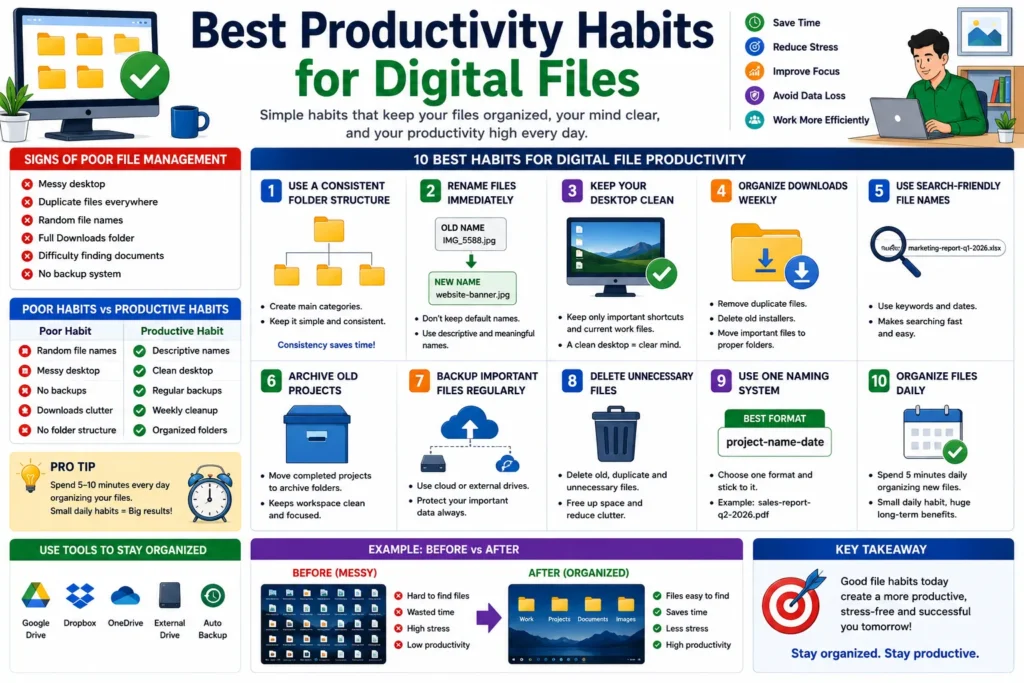
Signs of Poor File Management
- ❌ Messy desktop
- ❌ Duplicate files everywhere
- ❌ Random file names
- ❌ Full Downloads folder
- ❌ Difficulty finding documents
- ❌ No backup system
Best Productivity Habits for Digital Files
1. Use a Consistent Folder Structure
Create simple categories and stick to them.
Work/
Projects/
Documents/
Images/
Backups/
👉 Consistency saves time.
2. Rename Files Immediately
Do not keep default file names.
Bad Example:
IMG_5588.jpg
Document1.pdf
Better Example:
client-contract-may-2026.pdf
website-banner-design.jpg
3. Keep Your Desktop Clean
A cluttered desktop creates distractions.
Keep only:
- ✔ Important shortcuts
- ✔ Current project folders
- ✔ Temporary work items
4. Organize Downloads Weekly
The Downloads folder becomes messy very quickly.
Delete:
- ✔ Duplicate files
- ✔ Old installers
- ✔ Temporary downloads
5. Use Search-Friendly File Names
Descriptive file names make searching easier.
Example:
marketing-report-q1-2026.xlsx
👉 Easy to locate instantly.
6. Archive Old Projects
Move completed work into archive folders.
Archive/
│
├── 2024/
├── 2025/
└── Completed Projects/
7. Backup Important Files Regularly
Never depend on a single device.
Popular backup options:
- ✔ Google Drive
- ✔ Dropbox
- ✔ OneDrive
- ✔ External hard drives
8. Delete Unnecessary Files
Old files waste storage and create clutter.
👉 Monthly cleanup improves organization.
9. Use One Naming System
Choose one format and use it everywhere.
Example:
project-name-date
Examples:
- website-redesign-june-2026
- sales-report-q2-2026
10. Organize Files Daily
Spend 5 minutes each day organizing new files.
👉 Small habits prevent large messes.
Poor Habits vs Productive Habits
| Poor Habit | Productive Habit |
|---|---|
| Random file names | Descriptive names |
| Messy desktop | Clean desktop |
| No backups | Regular backups |
| Downloads clutter | Weekly cleanup |
| No folder structure | Organized folders |
How Good File Habits Improve Productivity
Organized digital files help users:
- ✔ Find files faster
- ✔ Reduce stress
- ✔ Improve workflow
- ✔ Save time daily
- ✔ Avoid data loss
Even saving 10 minutes per day can add up to dozens of hours each year.
Pro Tips Used by Professionals
- ✔ Use cloud storage
- ✔ Keep folder names simple
- ✔ Archive completed projects
- ✔ Backup automatically
- ✔ Organize files before ending the workday
Common Mistakes to Avoid
- ❌ Saving everything on desktop
- ❌ Using “New Folder” repeatedly
- ❌ Keeping duplicate documents
- ❌ Never cleaning Downloads
- ❌ Ignoring backups
Use Our Free File Renaming Tool
If you want better file organization and productivity, use our free tool:
- ✔ Bulk file renaming
- ✔ Smart file naming
- ✔ Instant preview
- ✔ No upload required
FAQ
Q1: What is the most important file organization habit?
Using a consistent folder structure and naming system.
Q2: How often should digital files be organized?
Daily organization and weekly cleanup work best.
Q3: Why are backups important?
Backups protect important files from accidental loss.
Q4: Does file organization improve productivity?
Yes, organized files save time and reduce stress.
Conclusion
The best productivity habits for digital files are simple but powerful. Organized folders, proper file naming, regular cleanup and backups can save time, reduce frustration and significantly improve daily workflow.