Website speed is one of the most important ranking factors in modern SEO, and images are often the biggest reason websites load slowly. Large image files increase page load times, hurt user experience, reduce Core Web Vitals scores, and can even lower your search engine rankings.
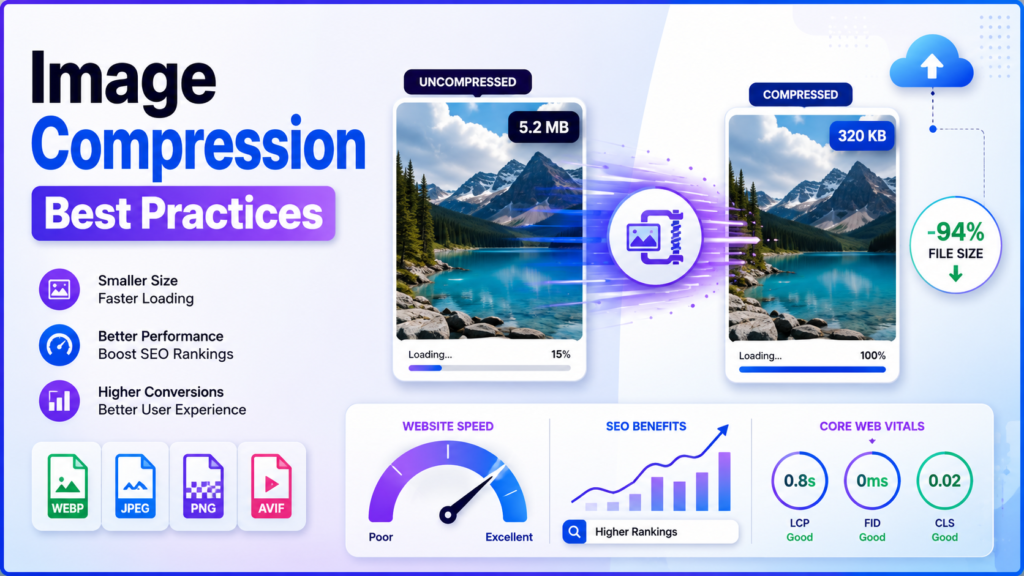
By following the right image compression best practices, you can significantly reduce image file sizes without sacrificing visual quality. This leads to faster-loading pages, improved SEO performance, better user engagement, and higher conversion rates.
In this guide, you’ll learn everything about image compression, including the best formats, tools, techniques, and optimization strategies for websites.
What Is Image Compression?
Image compression is the process of reducing the file size of an image while maintaining acceptable visual quality.
The primary goal is to make images load faster without making them appear blurry or pixelated.
Compressed images help websites:
- Load faster
- Use less bandwidth
- Improve user experience
- Increase SEO rankings
- Improve Core Web Vitals
- Reduce hosting storage requirements
Why Image Compression Matters for SEO
Google considers page speed an important ranking factor.
When images are too large:
- Pages load slowly
- Largest Contentful Paint (LCP) increases
- Mobile performance decreases
- Bounce rates rise
- User satisfaction drops
Properly compressed images contribute to:
- Better PageSpeed Insights scores
- Faster mobile browsing
- Improved indexing
- Higher search rankings
- Better conversion rates
Benefits of Compressing Images
Faster Website Loading
Smaller image files download much faster, improving the overall browsing experience.
Better Core Web Vitals
Compressed images improve important performance metrics such as:
- Largest Contentful Paint (LCP)
- First Contentful Paint (FCP)
- Speed Index
Improved SEO Rankings
Fast-loading websites generally perform better in Google Search because they provide a better user experience.
Lower Bandwidth Usage
Compressed images consume less server bandwidth, making your website more efficient and reducing hosting costs.
Better Mobile Experience
Mobile users often browse on slower networks. Smaller images help pages load quickly even on limited internet connections.
Types of Image Compression
Lossy Compression
Lossy compression removes unnecessary image data to achieve much smaller file sizes.
Advantages
- Very small file sizes
- Faster loading
- Excellent for websites
Disadvantages
- Slight quality reduction
- Not suitable for high-end photography archives
Common formats:
- JPEG
- WebP (Lossy)
- AVIF (Lossy)
Lossless Compression
Lossless compression reduces file size without removing image data.
Advantages
- No quality loss
- Perfect image reproduction
Disadvantages
- Larger files than lossy compression
Common formats:
- PNG
- GIF
- WebP Lossless
Best Image Formats for Websites
JPEG
Best for:
- Photographs
- Blog images
- Product photos
- Landscapes
Advantages:
- Small size
- Excellent compatibility
PNG
Best for:
- Logos
- Transparent images
- Icons
- Graphics
Advantages:
- Transparency support
- Lossless quality
WebP
WebP is one of the best modern image formats.
Benefits include:
- Smaller than JPEG
- Better quality
- Supports transparency
- Supports animation
Ideal for most modern websites.
AVIF
AVIF provides even better compression than WebP.
Benefits:
- Extremely small files
- High image quality
- Excellent performance
The only limitation is that older browsers may have limited support.
Best Image Compression Techniques
Resize Images Before Uploading
Avoid uploading a 5000-pixel image if your website only displays it at 1200 pixels.
Always resize images before compression.
Choose the Right File Format
Use:
- JPEG for photographs
- PNG for graphics
- WebP for general web use
- AVIF where supported
Compress Before Uploading
Always compress images before adding them to your website.
Doing this saves:
- Server resources
- Storage space
- Loading time
Enable Lazy Loading
Lazy loading delays loading images until users scroll near them.
Benefits:
- Faster initial page load
- Better performance scores
- Reduced bandwidth usage
Use Responsive Images
Different devices require different image sizes.
Responsive images automatically deliver the correct size for:
- Desktop
- Tablet
- Mobile
Use a Content Delivery Network (CDN)
A CDN serves images from servers closest to visitors.
Benefits:
- Faster loading worldwide
- Lower server load
- Improved reliability
Recommended Image Compression Tools
Some of the most popular tools include:
TinyPNG
Ideal for:
- PNG
- JPEG
- Quick optimization
ImageOptim
Perfect for Mac users looking for lossless optimization.
Squoosh
A browser-based image compression tool developed by Google.
Supports:
- WebP
- AVIF
- JPEG
- PNG
ShortPixel
Popular WordPress optimization plugin.
Features:
- Automatic compression
- WebP conversion
- AVIF support
Imagify
Another excellent WordPress image optimization plugin with automatic compression features.
Common Image Compression Mistakes
Avoid these mistakes:
- Uploading original camera images
- Using PNG for photographs
- Compressing images multiple times
- Ignoring mobile optimization
- Not using lazy loading
- Forgetting image dimensions
- Using oversized hero images
Image Compression Best Practices Checklist
Before publishing any webpage, ensure that:
- Images are resized correctly
- Images are compressed
- Appropriate file formats are used
- Lazy loading is enabled
- Responsive images are implemented
- WebP or AVIF versions are available
- File names are SEO-friendly
- Alt text is added
- Images are cached
- CDN is enabled
How Image Compression Improves User Experience
Fast websites encourage users to:
- Stay longer
- Browse more pages
- Complete purchases
- Submit forms
- Return in the future
A delay of even one second can reduce conversions, making image optimization a critical part of website performance.
Frequently Asked Questions
What is the best image format for websites?
WebP is currently one of the best formats because it offers excellent compression with high image quality. AVIF can provide even better compression where supported.
Does image compression reduce quality?
Lossy compression slightly reduces quality, but when done correctly, the difference is usually invisible to visitors. Lossless compression preserves the original quality.
Should I compress images before uploading?
Yes. Compressing images before uploading reduces storage usage, speeds up page loading, and improves SEO.
Is WebP better than JPEG?
In most cases, yes. WebP typically produces smaller files while maintaining similar or better visual quality than JPEG.
How much should images be compressed?
Aim to reduce file sizes as much as possible while keeping images visually clear. For most web images, a quality setting between 70% and 85% works well.
Final Thoughts
Image compression is one of the simplest yet most effective ways to improve website performance, SEO, and user experience. By choosing the right image formats, resizing images appropriately, enabling lazy loading, and using modern compression tools, you can dramatically reduce page load times without sacrificing quality.
Whether you manage a personal blog, an eCommerce store, or a business website, implementing these image compression best practices will help you create a faster, more efficient site that performs well in search engines and provides a better experience for every visitor.
Start optimizing your images today, and you’ll see the benefits in faster loading speeds, improved Core Web Vitals, stronger SEO performance, and happier users.