Google Images is much smarter than most people think. Search engines do not “see” photos like humans, but they use multiple signals to understand image content. In this guide, you will learn how Google Images understands photos and how proper image optimization improves SEO.
Quick Answer
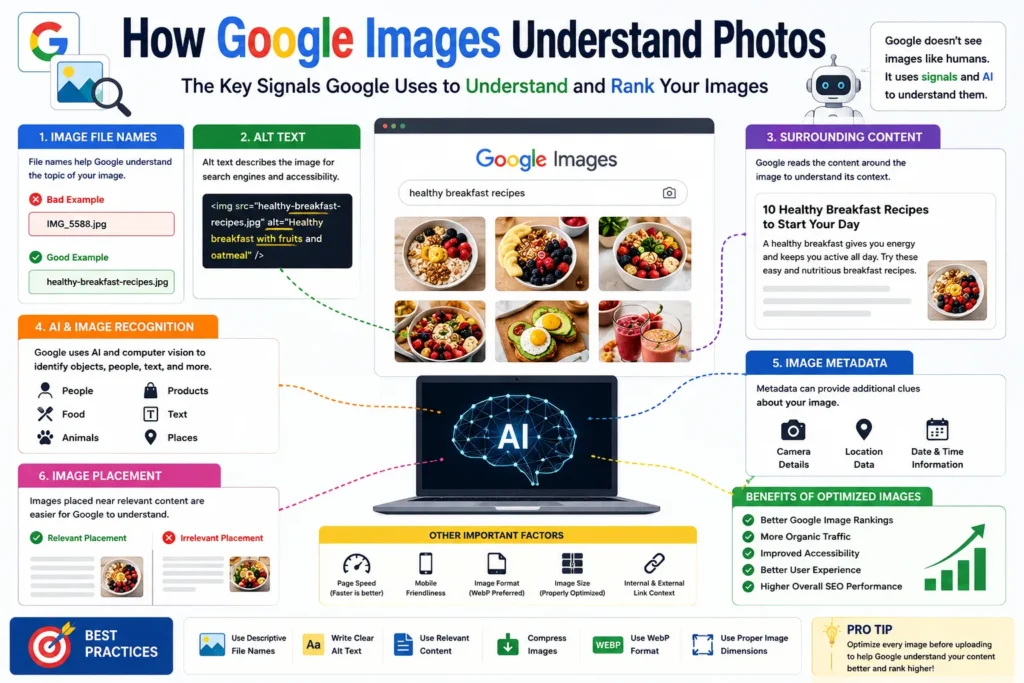
Google Images understands photos using file names, alt text, surrounding content, image recognition AI and page context.
Why Google Image Understanding Matters
When Google properly understands your images, they can appear in:
- ✔ Google Images search
- ✔ Featured snippets
- ✔ Visual search results
- ✔ Product search
- ✔ Organic website rankings
👉 Better image optimization can increase website traffic.
How Google Understands Photos
1. Image File Names
The image file name helps Google understand the topic.
Bad Example:
IMG_5588.jpg
photo-final.png
Good Example:
healthy-breakfast-recipes.jpg
blue-running-shoes.webp
👉 Descriptive file names improve image relevance.
2. Alt Text
Alt text describes the image for search engines and accessibility tools.
Example:
alt="Healthy breakfast with fruits and oatmeal"
👉 Alt text is one of the strongest image SEO signals.
3. Surrounding Content
Google reads nearby text, headings and paragraphs around the image.
If an article talks about “running shoes,” Google expects related images.
👉 Context matters a lot.
4. Artificial Intelligence (AI)
Google uses advanced AI and computer vision to recognize objects inside images.
Google can identify:
- ✔ People
- ✔ Animals
- ✔ Products
- ✔ Food
- ✔ Text inside images
- ✔ Locations
👉 Even without perfect alt text, Google can partially understand images visually.
5. Image Metadata
Sometimes metadata also provides useful information.
Examples:
- ✔ Camera details
- ✔ Location data
- ✔ Image creation information
6. Image Placement on Page
Images placed near relevant content are easier for Google to understand.
👉 Random unrelated images confuse search engines.
Main Signals Google Uses
| SEO Signal | Importance |
|---|---|
| Alt Text | Very High |
| File Name | High |
| Page Content | High |
| AI Image Recognition | High |
| Metadata | Medium |
How to Help Google Understand Your Images Better
- ✔ Use descriptive image file names
- ✔ Add proper alt text
- ✔ Compress images for speed
- ✔ Use relevant surrounding content
- ✔ Use modern image formats like WEBP
- ✔ Use responsive image sizes
Common Image SEO Mistakes
- ❌ Random image names
- ❌ Missing alt text
- ❌ Huge image file sizes
- ❌ Keyword stuffing
- ❌ Using unrelated images
Why Google Images Matter for SEO
Google Images can bring additional traffic from visual searches.
Optimized images improve:
- ✔ Website visibility
- ✔ Organic traffic
- ✔ User experience
- ✔ SEO performance
Example of Proper Image Optimization
File Name:
wordpress-speed-optimization.webp
Alt Text:
WordPress website speed optimization dashboard
👉 Both clearly explain the image topic.
Pro Tips
- ✔ Rename images before uploading
- ✔ Keep alt text natural
- ✔ Compress images properly
- ✔ Use relevant captions
- ✔ Match images with page content
Use Our Free File Renaming Tool
If you want SEO-friendly image names, use our free tool:
- ✔ Bulk image renaming
- ✔ SEO-friendly names
- ✔ Instant preview
- ✔ No upload required
👉 Optimize Image File Names Now
FAQ
Q1: Can Google actually recognize images?
Yes, Google uses AI to identify objects and content inside images.
Q2: Does alt text help Google understand photos?
Yes, alt text is one of the most important image SEO signals.
Q3: Are image file names important?
Yes, descriptive file names improve image relevance.
Q4: Can images rank in Google search?
Yes, optimized images can rank in Google Images.
Conclusion
Google Images understands photos using multiple signals like file names, alt text, AI recognition and surrounding content. Proper image optimization improves SEO, accessibility and the chances of ranking in image search results.