Successful YouTubers create hundreds of files for every channel, including videos, thumbnails, scripts, music, graphics and project files. Without a proper system, content creation becomes slow and stressful. In this guide, you’ll learn the best folder structure for YouTubers to stay organized and productive.
Quick Answer
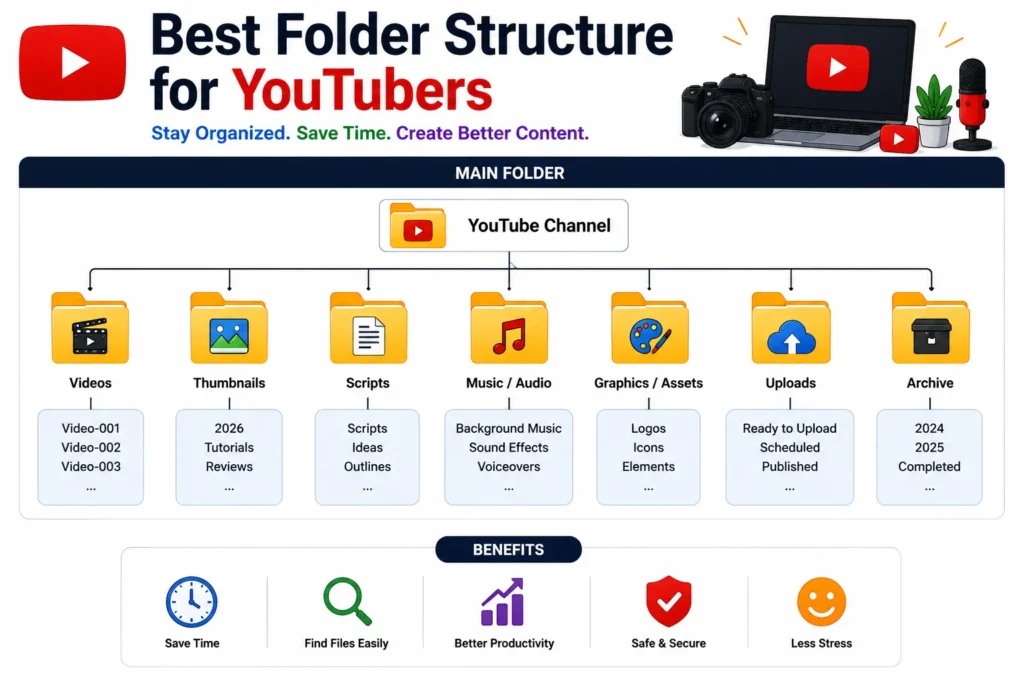
The best folder structure for YouTubers separates videos, thumbnails, scripts, assets and completed projects into organized folders with consistent naming conventions.
Why Folder Organization Matters for YouTubers
Every YouTube video generates multiple files:
- ✔ Raw video footage
- ✔ Edited videos
- ✔ Thumbnails
- ✔ Scripts
- ✔ Audio files
- ✔ Project files
👉 Without organization, files become difficult to find and manage.
Problems Caused by Poor Organization
- ❌ Lost video files
- ❌ Duplicate thumbnails
- ❌ Missing project assets
- ❌ Slow editing workflow
- ❌ Wasted storage space
- ❌ Missed publishing deadlines
Best Folder Structure for YouTubers
1. Create a Main YouTube Folder
YouTube Channel/
Everything related to your channel should stay inside this folder.
2. Organize by Content Type
YouTube Channel/
│
├── Videos/
├── Thumbnails/
├── Scripts/
├── Music/
├── Graphics/
├── Uploads/
└── Archive/
👉 Simple and easy to manage.
3. Create Project Folders for Every Video
For large channels, each video should have its own folder.
Videos/
│
├── Video-001/
├── Video-002/
├── Video-003/
👉 Keeps all project files together.
4. Organize Video Project Files
Video-001/
│
├── Raw Footage/
├── Edited Version/
├── Thumbnail/
├── Audio/
├── Script/
└── Final Export/
👉 Makes editing much faster.
5. Use Clear File Names
Avoid:
video-final.mp4
thumbnail-new.jpg
IMG_5588.jpg
Use:
youtube-seo-tips-video.mp4
youtube-seo-thumbnail.jpg
👉 Easier searching and organization.
Example of a Professional YouTube Folder Structure
YouTube Channel/
│
├── Videos/
│   ├── Video-001/
│   ├── Video-002/
│   └── Video-003/
│
├── Thumbnails/
│
├── Music/
│
├── Scripts/
│
├── Brand Assets/
│
└── Archive/
Organizing Thumbnails
Thumbnails are important assets and should have their own folder.
Thumbnails/
│
├── 2026/
├── Tutorials/
├── Reviews/
└── Shorts/
👉 Makes future updates easier.
Organizing Music and Sound Effects
Audio/
│
├── Background Music/
├── Sound Effects/
└── Voiceovers/
👉 Saves editing time.
Archive Old Videos
Move completed projects into archive folders.
Archive/
│
├── 2024/
├── 2025/
└── Published Videos/
👉 Keeps active workspace clean.
Use Cloud Backups
Professional YouTubers always backup important content.
Popular options:
- ✔ Google Drive
- ✔ Dropbox
- ✔ OneDrive
- ✔ External SSD
👉 Protects videos from accidental loss.
Benefits of Organized YouTube Files
- ✔ Faster editing
- ✔ Better workflow
- ✔ Easier collaboration
- ✔ Reduced stress
- ✔ Improved productivity
- ✔ Better content management
Poor Structure vs Professional Structure
| Poor Organization | Professional Organization |
|---|---|
| Files everywhere | Project-based folders |
| Random names | Consistent naming |
| No backups | Cloud backups |
| Mixed assets | Separate categories |
| Slow workflow | Fast workflow |
Pro Tips Used by YouTubers
- ✔ Rename files immediately
- ✔ Backup every project
- ✔ Keep thumbnails organized
- ✔ Archive old content monthly
- ✔ Use one naming system
Common YouTuber File Mistakes
- ❌ Saving everything in one folder
- ❌ Using random file names
- ❌ No backup strategy
- ❌ Keeping duplicate files
- ❌ Never archiving old videos
Use Our Free File Renaming Tool
If you want to organize YouTube files faster, use our free tool:
- ✔ Bulk file renaming
- ✔ Consistent naming system
- ✔ Instant preview
- ✔ No upload required
FAQ
Q1: How do YouTubers organize their files?
Using project-based folders for videos, thumbnails, scripts and assets.
Q2: Should every video have its own folder?
Yes, it keeps all project files organized and easy to find.
Q3: Why are backups important for YouTubers?
Videos can be difficult or impossible to recreate if lost.
Q4: What is the best naming system for YouTube files?
Use descriptive names with keywords and project details.
Conclusion
The best folder structure for YouTubers uses organized project folders, clear file names, separate asset categories and regular backups. A good system saves time, improves productivity and helps creators manage content more efficiently.