Professional video editors handle hundreds of files for every project, including raw footage, audio tracks, graphics, subtitles and final exports. Without a proper system, editing becomes slow and stressful. In this guide, you’ll learn how video editors organize projects to save time and work more efficiently.
Quick Answer
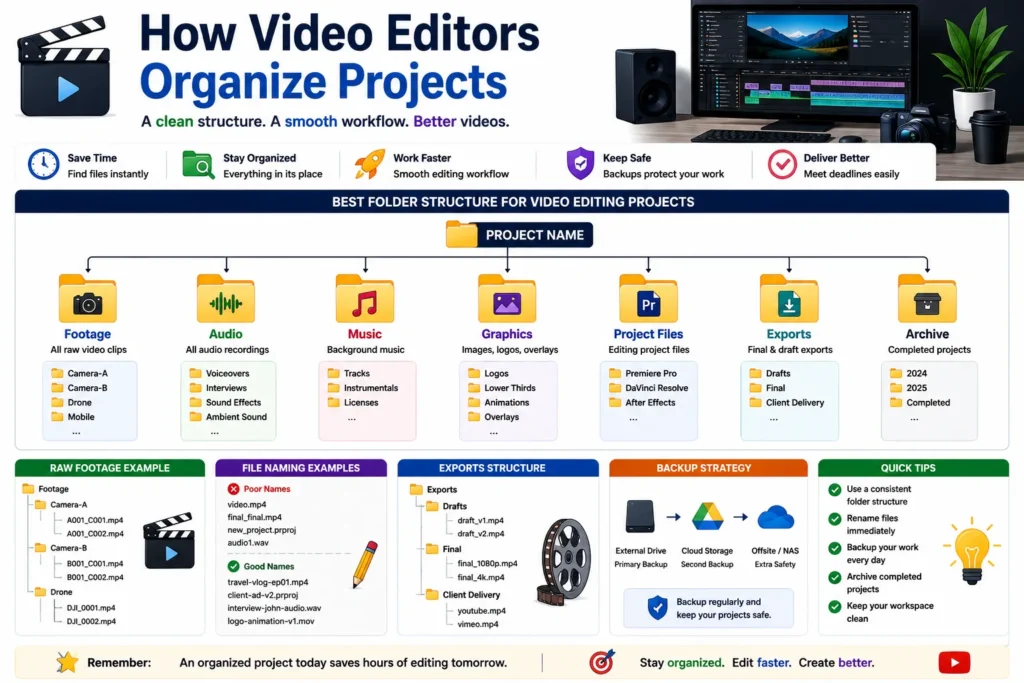
Video editors organize projects by creating structured folders for footage, audio, graphics, project files and exports while using clear naming conventions and backups.
Why Project Organization Matters
A single video project may contain:
- ✔ Raw video footage
- ✔ Audio files
- ✔ Music tracks
- ✔ Graphics and animations
- ✔ Subtitles
- ✔ Final exports
👉 Without organization, finding files becomes difficult and editing takes much longer.
Problems Caused by Poor Organization
- ❌ Lost footage
- ❌ Missing audio files
- ❌ Duplicate assets
- ❌ Slow editing workflow
- ❌ Broken project files
- ❌ Missed deadlines
How Video Editors Organize Projects
1. Create a Main Project Folder
Project Name/
Everything related to one project stays inside this folder.
2. Use Dedicated Subfolders
Project Name/
│
├── Footage/
├── Audio/
├── Music/
├── Graphics/
├── Project Files/
├── Exports/
└── Archive/
👉 Easy to locate files instantly.
3. Organize Raw Footage Properly
Footage/
│
├── Camera-A/
├── Camera-B/
├── Drone/
└── Mobile/
👉 Important for multi-camera projects.
4. Keep Audio Separate
Audio/
│
├── Voiceovers/
├── Interviews/
├── Sound Effects/
└── Ambient Sound/
👉 Makes audio editing much faster.
5. Store Graphics in One Place
Graphics/
│
├── Logos/
├── Lower Thirds/
├── Animations/
└── Overlays/
👉 Avoids missing assets during editing.
6. Save Project Files Separately
Project Files/
│
├── Premiere Pro/
├── DaVinci Resolve/
└── After Effects/
👉 Keeps editing files organized.
7. Use Clear File Names
Avoid names like:
video-final.mp4
new-project.prproj
audio1.wav
Use:
travel-vlog-episode-01.mp4
client-ad-v2.prproj
interview-audio.wav
👉 Easier searching and version tracking.
Example of a Professional Editing Structure
Project Name/
│
├── Footage/
├── Audio/
├── Music/
├── Graphics/
├── Project Files/
├── Exports/
└── Backup/
Organizing Exports
Final videos should be stored separately.
Exports/
│
├── Drafts/
├── Final/
└── Client Delivery/
👉 Prevents confusion between versions.
Backup Everything
Professional editors always keep backups.
Popular options:
- ✔ External SSD
- ✔ Google Drive
- ✔ Dropbox
- ✔ NAS Storage
👉 Losing footage can mean losing days of work.
Benefits of Organized Editing Projects
- ✔ Faster editing workflow
- ✔ Easier collaboration
- ✔ Better project management
- ✔ Less stress
- ✔ Faster file access
- ✔ Improved productivity
Messy vs Organized Projects
| Messy Project | Organized Project |
|---|---|
| Files everywhere | Structured folders |
| Random names | Consistent naming |
| Missing assets | Easy file access |
| Slow workflow | Fast workflow |
| Higher stress | Better productivity |
Pro Tips Used by Professional Editors
- ✔ Create project templates
- ✔ Backup footage daily
- ✔ Keep naming systems consistent
- ✔ Separate drafts and final exports
- ✔ Archive completed projects
Common Video Editing Mistakes
- ❌ Saving everything in one folder
- ❌ No backups
- ❌ Random file names
- ❌ Mixing project assets
- ❌ Keeping duplicate files everywhere
Use Our Free File Renaming Tool
If you want better project organization, use our free tool:
- ✔ Bulk file renaming
- ✔ Consistent naming system
- ✔ Instant preview
- ✔ No upload required
FAQ
Q1: How do professional video editors organize projects?
They use structured folders for footage, audio, graphics and exports.
Q2: Why is project organization important?
It saves time and prevents lost files.
Q3: Should editors backup projects?
Yes, backups are essential for protecting valuable footage.
Q4: What is the best file naming method?
Use descriptive names that clearly identify project content.
Conclusion
Video editors organize projects using structured folders, clear file names and reliable backups. A good system improves workflow, reduces stress and helps editors complete projects more efficiently.