Images are important for website design, user experience and SEO. But uploading large images can slow down your website and hurt rankings. That’s why choosing the best image size for website SEO is very important.
In this guide, you will learn the ideal image dimensions, file sizes, formats and optimization methods for faster-loading SEO-friendly websites.
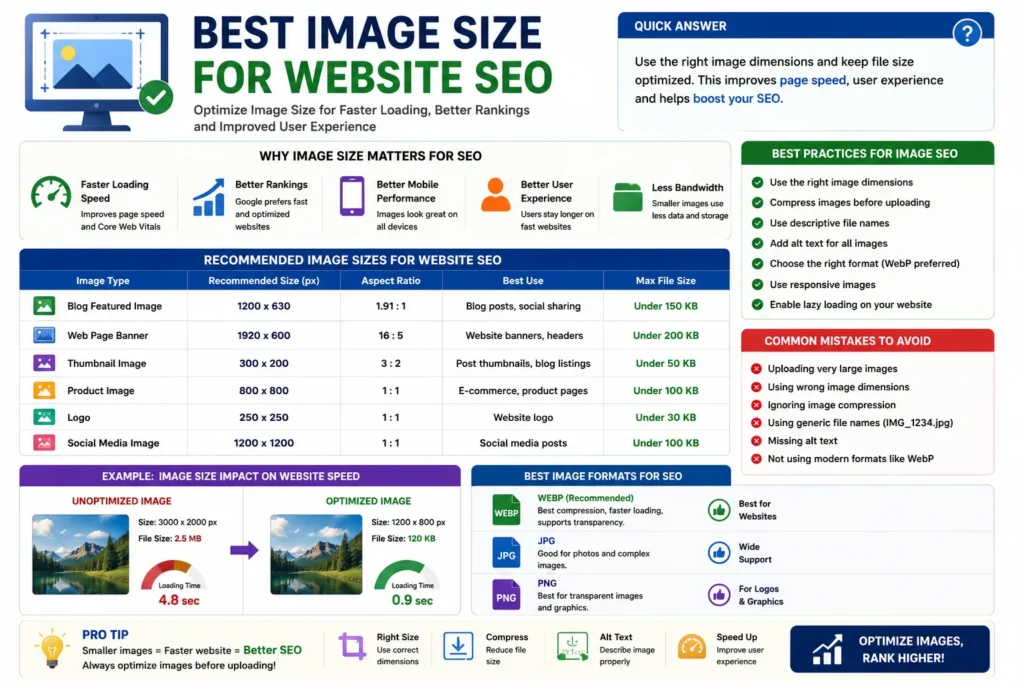
Quick Answer
The best image size for website SEO is usually under 200 KB with optimized dimensions and modern formats like WEBP.
Why Image Size Matters for SEO
Large image files increase page loading time, which affects:
- ✔ Website speed
- ✔ User experience
- ✔ Mobile performance
- ✔ Core Web Vitals
- ✔ Bounce rate
- ✔ Google rankings
👉 Faster websites usually rank better in search results.
Recommended Image Sizes for Websites
| Image Type | Recommended Dimensions | Ideal File Size |
|---|---|---|
| Blog Featured Image | 1200 × 630 px | Under 150 KB |
| Website Banner | 1920 × 1080 px | Under 500 KB |
| Thumbnail Image | 300 × 300 px | Under 50 KB |
| Product Image | 800 × 800 px | Under 100 KB |
| Logo | 250 × 250 px | Under 30 KB |
| Pinterest Image | 1000 × 1500 px | Under 200 KB |
Best Image Formats for SEO
1. WEBP (Recommended)
- ✔ Smaller file size
- ✔ Faster loading
- ✔ Better compression
- ✔ Great for SEO
2. JPG / JPEG
- ✔ Widely supported
- ✔ Good for photos
- ✔ Easy to use
3. PNG
- ✔ Better graphics quality
- ✔ Supports transparency
- ❌ Larger file sizes
Why Smaller Images Improve SEO
Optimized images help websites:
- ✔ Load faster
- ✔ Improve mobile speed
- ✔ Reduce bandwidth usage
- ✔ Improve Core Web Vitals
- ✔ Lower bounce rates
👉 Google prefers fast-loading pages.
Example of Image Size Impact
| Unoptimized Image | Optimized Image |
|---|---|
| 3000 × 2000 px | 1200 × 800 px |
| 2.5 MB | 120 KB |
| Slow loading | Fast loading |
Best Practices for Image SEO
- ✔ Resize images before upload
- ✔ Compress images properly
- ✔ Use WEBP format when possible
- ✔ Add descriptive file names
- ✔ Use proper alt text
- ✔ Enable lazy loading
- ✔ Use responsive images
Common Image SEO Mistakes
- ❌ Uploading huge images
- ❌ Using random file names
- ❌ Ignoring image compression
- ❌ Missing alt text
- ❌ Using wrong dimensions
Best Tools to Optimize Images
- ✔ TinyPNG
- ✔ Squoosh
- ✔ Canva
- ✔ Photoshop
- ✔ ImageOptim
Pro Tips
- ✔ Keep blog images under 200 KB
- ✔ Use WEBP for modern websites
- ✔ Test page speed regularly
- ✔ Avoid oversized graphics
- ✔ Optimize every image before upload
Use Our Free File Renaming Tool
If you want SEO-friendly image file names, use our free tool:
- ✔ Bulk image renaming
- ✔ SEO-friendly names
- ✔ Instant preview
- ✔ No upload required
👉 Optimize Image File Names Now
FAQ
Q1: What is the best image size for SEO?
Usually under 200 KB with optimized dimensions.
Q2: Which image format is best for SEO?
WEBP is generally the best format for modern websites.
Q3: Does image size affect rankings?
Indirectly yes, because large images slow down websites.
Q4: Should I compress images before upload?
Yes, image compression is very important for SEO and speed.
Conclusion
The best image size for website SEO depends on proper dimensions, optimized file size and modern image formats like WEBP. Smaller optimized images improve loading speed, user experience and overall SEO performance.