Image optimization is one of the most overlooked aspects of SEO. While website owners focus on content, backlinks, and technical SEO, image formats can significantly impact page speed, user experience, Core Web Vitals, and search engine rankings.
Choosing the right image format can reduce file sizes, improve loading speed, lower bounce rates, and enhance overall website performance. The three most common image formats used on websites are WEBP, PNG, and JPG.
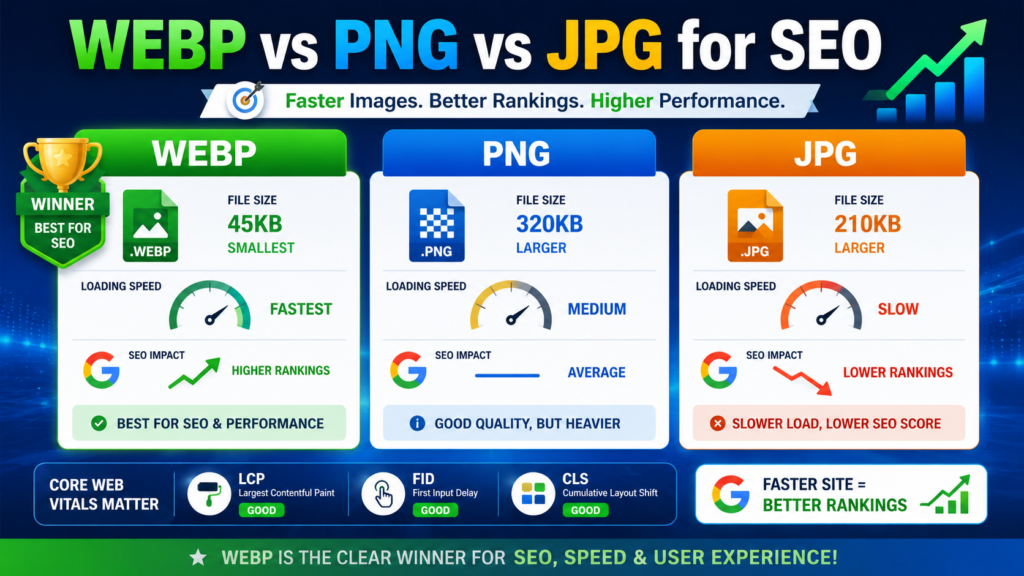
But which one is best for SEO?
In this guide, we’ll compare WEBP vs PNG vs JPG, analyze their impact on search engine optimization, and help you choose the ideal format for different use cases.
Why Image Format Matters for SEO
Search engines prioritize websites that provide a fast and seamless user experience. Images often account for the largest portion of a webpage’s total size.
Using the wrong image format can lead to:
- Slow page loading times
- Poor Core Web Vitals scores
- Higher bounce rates
- Increased bandwidth usage
- Reduced mobile performance
Proper image optimization helps improve:
- Page Speed
- Largest Contentful Paint (LCP)
- User Experience (UX)
- Mobile SEO
- Crawl Efficiency
- Search Rankings
What is JPG (JPEG)?
JPG (Joint Photographic Experts Group) is one of the most widely used image formats on the internet.
It uses lossy compression, meaning some image data is removed to reduce file size.
Advantages of JPG
- Small file sizes
- Fast loading speeds
- Excellent for photographs
- Supported by all browsers and devices
- Easy to compress
Disadvantages of JPG
- Loss of image quality after compression
- Does not support transparency
- Not ideal for logos and graphics
Best Use Cases for JPG
- Blog featured images
- Product photos
- Travel photography
- News websites
- Lifestyle blogs
What is PNG?
PNG (Portable Network Graphics) is a lossless image format that preserves image quality even after compression.
Unlike JPG, PNG supports transparent backgrounds.
Advantages of PNG
- High image quality
- Supports transparency
- Ideal for graphics and logos
- Sharp text rendering
Disadvantages of PNG
- Larger file sizes
- Slower page loading times
- Increased bandwidth consumption
Best Use Cases for PNG
- Company logos
- Icons
- Infographics
- Screenshots
- Images requiring transparency
What is WEBP?
WEBP is a modern image format developed by Google that combines the advantages of both JPG and PNG while significantly reducing file sizes.
WEBP supports both lossy and lossless compression as well as transparency.
Advantages of WEBP
- Smaller file sizes
- Faster page loading
- Supports transparency
- Better compression efficiency
- Improves Core Web Vitals
Disadvantages of WEBP
- Limited support in some older systems
- May require image conversion tools
Best Use Cases for WEBP
- Blog images
- E-commerce websites
- Landing pages
- Portfolio websites
- High-traffic websites
WEBP vs PNG vs JPG: Quick Comparison
| Feature | WEBP | PNG | JPG |
|---|---|---|---|
| Compression Type | Lossy & Lossless | Lossless | Lossy |
| File Size | Smallest | Largest | Medium |
| Transparency Support | Yes | Yes | No |
| Image Quality | Excellent | Excellent | Good |
| SEO Performance | Best | Average | Good |
| Browser Support | Modern Browsers | Universal | Universal |
| Loading Speed | Fastest | Slowest | Fast |
WEBP vs JPG for SEO
When comparing WEBP and JPG for SEO, WEBP is generally the better option.
Why WEBP Beats JPG
- Up to 30–50% smaller file sizes
- Faster page load times
- Better Core Web Vitals scores
- Improved mobile performance
- Reduced server load
When to Use JPG Instead
JPG remains useful when:
- Maximum compatibility is required
- Images are distributed across multiple platforms
- Legacy systems do not support WEBP
Winner: WEBP
For most websites, WEBP provides superior SEO benefits compared to JPG.
WEBP vs PNG for SEO
PNG files are known for excellent quality but often create performance issues due to large file sizes.
Why WEBP is Better Than PNG
- Significantly smaller files
- Faster website speed
- Better user experience
- Lower bandwidth usage
When PNG is Better
PNG should be used when:
- Lossless quality is essential
- Design elements require transparency
- Detailed graphics must remain pixel-perfect
Winner: WEBP
WEBP offers nearly the same quality while drastically reducing file size.
How Image Formats Affect Core Web Vitals
Google’s Core Web Vitals directly influence user experience and can impact SEO performance.
Large image files often hurt:
Largest Contentful Paint (LCP)
Large PNG and JPG files can delay the loading of the main content.
Interaction to Next Paint (INP)
Heavy images increase page resource usage and affect responsiveness.
Cumulative Layout Shift (CLS)
Improperly optimized images can cause layout shifts during loading.
WEBP helps improve all three metrics by reducing image size and speeding up rendering.
Which Image Format Does Google Recommend?
Google strongly encourages the use of next-generation image formats such as WEBP.
These formats help websites:
- Load faster
- Improve user experience
- Reduce data consumption
- Enhance Core Web Vitals
For SEO-focused websites, WEBP is often the preferred choice.
Best Image Format for Different SEO Scenarios
For Blog Posts
Use WEBP.
Benefits:
- Fast loading
- Better rankings
- Improved user experience
For E-commerce Websites
Use WEBP.
Benefits:
- Faster product pages
- Better mobile performance
- Increased conversions
For Logos
Use PNG or WEBP.
Benefits:
- Transparency support
- High-quality rendering
For Photography Websites
Use WEBP.
Benefits:
- Excellent quality
- Smaller file sizes
For Screenshots and Graphics
Use PNG when image quality is critical.
Use WEBP if file size optimization is a priority.
Image SEO Best Practices
Choosing the right format is only one part of image SEO.
Follow these additional best practices:
Compress Images
Use image compression tools before uploading images.
Add Descriptive File Names
Example:
- webp-vs-png-vs-jpg.webp
- image-seo-guide.webp
Write Optimized Alt Text
Example:
“Comparison of WEBP, PNG, and JPG image formats for SEO.”
Use Lazy Loading
Lazy loading delays image loading until users scroll to them.
Specify Image Dimensions
Always define width and height attributes to reduce layout shifts.
Create an Image Sitemap
Help search engines discover and index your images faster.
Common Mistakes to Avoid
Uploading Massive PNG Files
Large PNG images can significantly slow down your website.
Ignoring Image Compression
Uncompressed images negatively affect page speed.
Using JPG for Transparent Graphics
JPG does not support transparency.
Not Converting Images to WEBP
Many websites still miss out on performance gains by using outdated formats.
Frequently Asked Questions
Is WEBP Better Than JPG for SEO?
Yes. WEBP usually provides smaller file sizes and faster loading speeds, making it more SEO-friendly.
Is PNG Better Than WEBP?
Only in situations where lossless quality and transparency are critical.
Does Google Prefer WEBP Images?
Google recommends next-generation image formats like WEBP because they improve performance and user experience.
Can I Use Both WEBP and JPG?
Yes. Many websites serve WEBP images to supported browsers and fall back to JPG for compatibility.
Does Image Format Affect Search Rankings?
Indirectly, yes. Better image formats improve page speed and Core Web Vitals, which contribute to SEO performance.
Final Verdict: WEBP vs PNG vs JPG for SEO
If your goal is maximizing SEO performance, website speed, and user experience, WEBP is the clear winner.
Choose WEBP When:
- You want the best SEO performance
- Website speed is a priority
- You need transparency support
- You want smaller file sizes
Choose PNG When:
- Lossless quality is essential
- Transparency is required
- Graphic design elements need maximum clarity
Choose JPG When:
- Universal compatibility is needed
- You are working with older systems
- Image quality requirements are moderate
For most modern websites, WEBP provides the ideal balance of image quality, file size, and SEO benefits, making it the best image format for search engine optimization in 2026.