Keeping computer files organized is important for productivity, faster workflow and stress-free file management. When files are scattered everywhere, it becomes difficult to find important documents, images, videos and projects. In this guide, you will learn how to keep computer files organized using simple and effective methods.
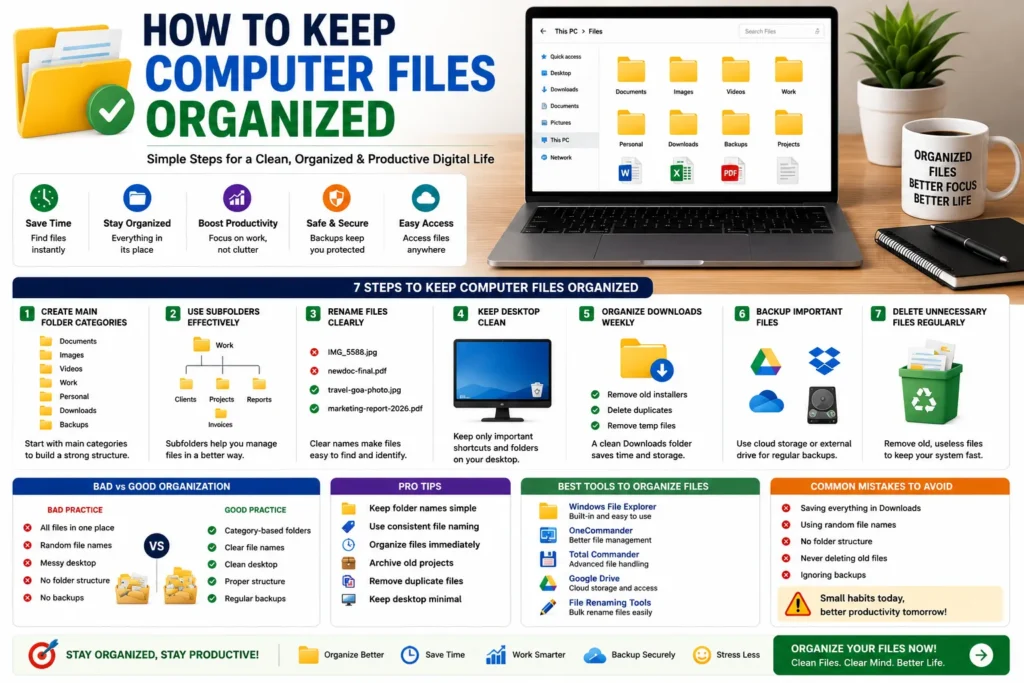
Quick Answer
The best way to keep computer files organized is by using category-based folders, proper file names, regular cleanup routines and cloud backups.
Why File Organization Matters
- ✔ Faster file searching
- ✔ Better productivity
- ✔ Cleaner storage
- ✔ Less stress and clutter
- ✔ Easier backups
- ✔ Better workflow management
Problems Caused by Messy Files
Most users face file organization problems like:
- ❌ Random downloads
- ❌ Duplicate files
- ❌ Messy desktop
- ❌ Lost documents
- ❌ Confusing file names
- ❌ Wasted storage space
👉 These problems reduce productivity and waste time daily.
Best Ways to Keep Computer Files Organized
1. Create Main Category Folders
Start by creating simple main folders.
Documents/
Images/
Videos/
Work/
Personal/
Downloads/
Backups/
👉 This creates a clean structure.
2. Use Subfolders Properly
Inside each main folder, create smaller organized sections.
Work/
│
├── Clients/
├── Projects/
├── Reports/
└── Invoices/
👉 Easy to manage and search files.
3. Rename Files Clearly
Random file names create confusion.
Bad Example:
IMG_5588.jpg
newdoc-final.pdf
Good Example:
travel-goa-photo.jpg
marketing-report-2026.pdf
4. Keep Desktop Clean
Professionals avoid storing too many files directly on desktop.
👉 Use folders instead.
5. Organize Downloads Folder Weekly
The Downloads folder becomes messy quickly.
Delete:
- ✔ Old installers
- ✔ Duplicate files
- ✔ Temporary downloads
6. Backup Important Files
Always keep backups of important documents and projects.
Best options:
- ✔ Google Drive
- ✔ Dropbox
- ✔ OneDrive
- ✔ External hard drive
7. Delete Unnecessary Files Regularly
Old files waste storage and create clutter.
👉 Monthly cleanup improves performance.
Bad vs Good File Organization
| Bad Practice | Good Practice |
|---|---|
| All files mixed together | Category-based folders |
| Random names | Clear descriptive names |
| No cleanup | Regular organization |
| No backups | Cloud backup system |
Pro Tips for Better Organization
- ✔ Keep folder names simple
- ✔ Use consistent file naming
- ✔ Archive old projects
- ✔ Remove duplicate files
- ✔ Organize files immediately
- ✔ Keep desktop minimal
Best Tools to Organize Computer Files
- ✔ Windows File Explorer
- ✔ OneCommander
- ✔ Total Commander
- ✔ Google Drive
- ✔ File renaming tools
Why Organized Files Improve Productivity
Organized files save time and reduce frustration. Instead of wasting minutes searching for files, users can instantly access important documents and focus on work.
Clean file management also improves system performance and workflow efficiency.
Common Mistakes to Avoid
- ❌ Saving everything in Downloads
- ❌ Random file names
- ❌ No folder structure
- ❌ Never deleting old files
- ❌ Ignoring backups
Use Our Free File Renaming Tool
If you want to organize and rename files faster, use our free tool:
- ✔ Bulk renaming
- ✔ Smart file naming
- ✔ Instant preview
- ✔ No upload required
FAQ
Q1: What is the best way to organize computer files?
Using category-based folders and clear file names.
Q2: Why are my computer files always messy?
Because files are downloaded and saved daily without proper organization.
Q3: Should I keep files on desktop?
Only important shortcuts and temporary files should stay on desktop.
Q4: How often should files be cleaned?
Weekly or monthly cleanup is recommended.
Conclusion
Keeping computer files organized improves productivity, saves time and reduces stress. A simple folder structure, clear naming system and regular cleanup routine can completely transform your workflow.