Successful bloggers often manage thousands of images across hundreds or even thousands of blog posts. Featured images, screenshots, infographics, social media graphics, charts and product images can quickly create digital clutter if not organized properly. In this guide, you’ll learn how bloggers manage thousands of images efficiently while improving productivity and SEO.
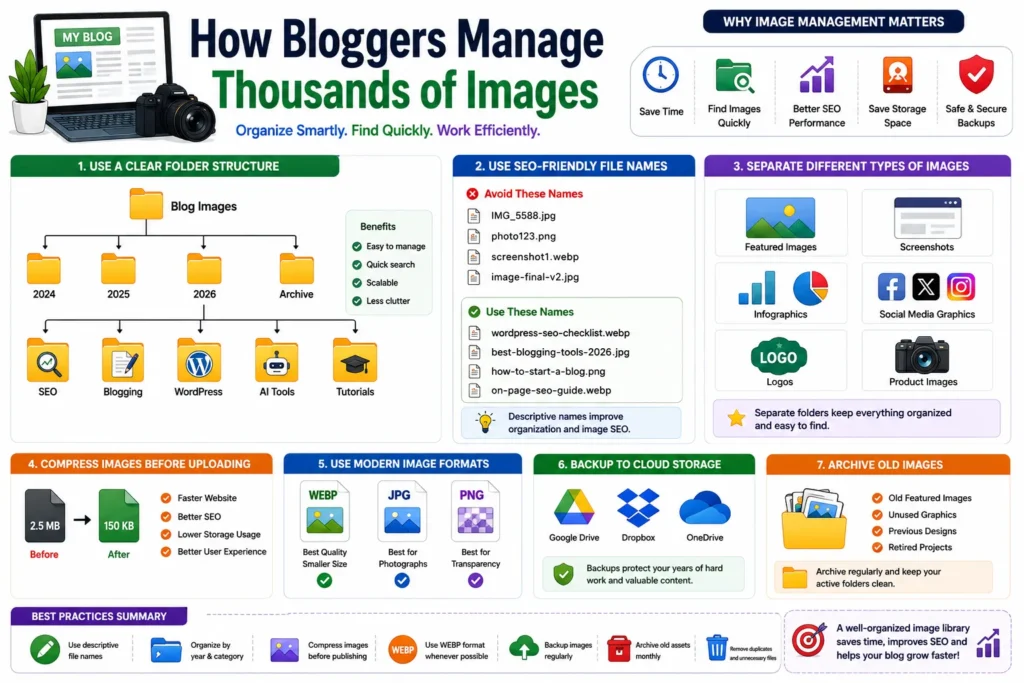
Why Image Management Matters for Bloggers
Images are a critical part of modern blogging. They improve engagement, support SEO and make content easier to understand.
However, as a blog grows, image management becomes more challenging.
- Finding old images becomes difficult
- Duplicate files waste storage
- Poor naming hurts SEO
- Large image libraries become disorganized
- Backups become harder to manage
Professional bloggers solve these problems with structured systems.
Use a Clear Folder Structure
Most experienced bloggers organize images using a simple hierarchy.
Blog Images/
│
├── 2024/
├── 2025/
├── 2026/
└── Archive/
Inside each year, images can be organized by topic.
2026/
│
├── SEO/
├── Blogging/
├── WordPress/
├── AI Tools/
└── Tutorials/
This structure makes searching much faster.
Use SEO-Friendly File Names
Professional bloggers rarely upload images with default camera names.
Bad Examples:
IMG_5588.jpg
photo123.png
screenshot1.webp
Better Examples:
wordpress-seo-checklist.webp
best-blogging-tools-2026.jpg
how-to-start-a-blog.png
Descriptive names improve both organization and image SEO.
Separate Different Types of Images
Many bloggers create separate folders for different image categories.
Images/
│
├── Featured Images/
├── Screenshots/
├── Infographics/
├── Social Media Graphics/
├── Logos/
└── Product Images/
This prevents important assets from getting mixed together.
Compress Images Before Uploading
Managing thousands of large images can quickly consume storage space.
Professional bloggers compress images before uploading them.
Benefits include:
- Faster website speed
- Better Core Web Vitals
- Reduced storage usage
- Improved SEO performance
Use Modern Image Formats
Most successful blogs now use WEBP images whenever possible.
| Format | Best Use |
|---|---|
| WEBP | Best overall choice |
| JPG | Photographs |
| PNG | Transparent graphics |
WEBP usually provides the best balance between quality and file size.
Store Original and Edited Versions Separately
Many bloggers keep original assets in separate folders.
Images/
│
├── Originals/
├── Edited/
└── Published/
This makes future editing much easier.
Use Cloud Storage Backups
Professional bloggers never rely on a single device.
Common backup solutions include:
- Google Drive
- Dropbox
- OneDrive
- External SSDs
Cloud backups protect years of content from accidental loss.
Archive Old Images
Older assets that are no longer used should be archived.
Archive/
│
├── Old Featured Images/
├── Unused Graphics/
├── Previous Designs/
└── Retired Projects/
This keeps active folders clean and manageable.
How Large Blogs Manage Image Libraries
Large blogging websites often use:
- Standardized naming conventions
- Dedicated image folders
- Cloud storage systems
- Weekly cleanup routines
- Automated backup systems
- Image optimization workflows
These systems allow them to manage tens of thousands of images efficiently.
Common Image Management Mistakes
- Keeping all images in one folder
- Using random file names
- Never deleting duplicate images
- Uploading uncompressed files
- Ignoring backups
- Using inconsistent folder structures
Best Practices for Bloggers
- Use descriptive file names
- Organize images by topic
- Compress images before publishing
- Use WEBP format where possible
- Backup image libraries regularly
- Archive old assets monthly
FAQ
How do bloggers manage thousands of images?
Most bloggers use organized folder structures, SEO-friendly file names, image compression and cloud backups.
Should images be organized by category?
Yes. Category-based folders make large image libraries much easier to manage.
Why are file names important?
Descriptive file names improve both image SEO and file organization.
What is the best image format for blogs?
WEBP is usually the best option because it offers excellent compression and quality.
Conclusion
Managing thousands of images becomes much easier when bloggers use structured folders, SEO-friendly file names, image compression and reliable backups. A good image management system saves time, improves SEO and helps blogs scale efficiently as they grow.