Agar aap thousands files ko smart tareeke se rename karna chahte ho, toh simple methods enough nahi hote. Yahan aata hai regex rename files ka concept—ek powerful technique jo complex renaming tasks ko automate kar deta hai.
Quick Answer
Regex (Regular Expressions) ek pattern-based system hai jo aapko files ko specific rules ke according rename karne deta hai—jaise numbers replace karna, words remove karna ya format change karna.
What is Regex?
Regex ek pattern-matching language hai jo text ko identify aur modify karne ke liye use hoti hai. File renaming mein, yeh aapko complex naming patterns automate karne deta hai.
Why Use Regex for File Renaming?
- Complex renaming tasks automate karta hai
- Time save hota hai
- Bulk processing easy ho jata hai
- High-level control milta hai
- Advanced users ke liye best tool
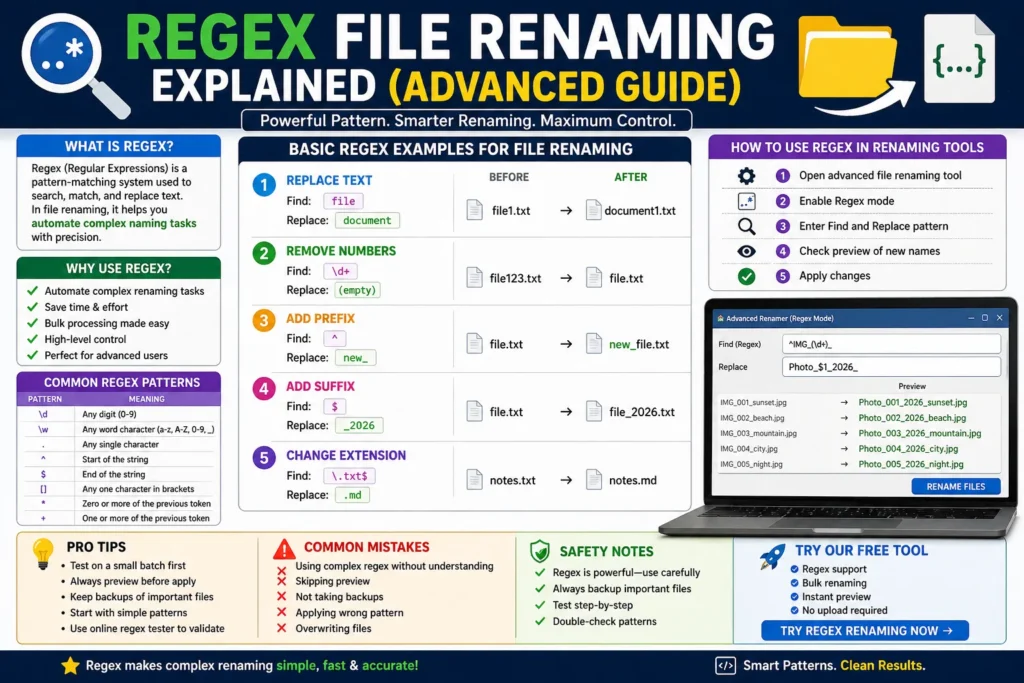
Basic Regex Examples
1. Replace Text
Find: file
Replace: document
Result: file1.txt → document1.txt
2. Remove Numbers
Find: \d+
Replace: (empty)
Result: file123.txt → file.txt
3. Add Prefix
Find: ^
Replace: new_
Result: file.txt → new_file.txt
4. Add Suffix
Find: $
Replace: _2026
Result: file.txt → file_2026.txt
Common Regex Patterns
| Pattern | Meaning |
|---|---|
| \d | Any number |
| \w | Word character |
| . | Any character |
| ^ | Start of string |
| $ | End of string |
How to Use Regex in File Renaming Tools
Step 1:
Advanced file renaming tool open karein
Step 2:
Regex mode enable karein
Step 3:
Find aur replace pattern enter karein
Step 4:
Preview check karein
Step 5:
Apply changes
Pro Tips
- Pehle small batch par test karein
- Always preview before apply
- Backup important files
- Simple patterns se start karein
- Online regex tester use karein
Common Mistakes
- Complex regex bina samjhe use karna
- Preview skip karna
- Backup na lena
- Wrong pattern apply karna
- Overwriting files
Safety Notes
- Regex powerful hai—carefully use karein
- Important files ka backup rakhein
- Step-by-step test karein
Use Our Free Tool (Regex Supported)
Agar aapko advanced renaming karna hai bina complexity ke, toh hamara tool use karein:
- Regex support
- Bulk renaming
- Instant preview
- No upload required
You can also read: Fastest Way to Rename Files
FAQ
Q1: Regex kya hota hai?
Ek pattern-based system jo text ko match aur modify karta hai.
Q2: Kya beginners regex use kar sakte hain?
Haan, basic patterns se start kar sakte hain.
Q3: Kya regex safe hai?
Haan, lekin preview aur backup zaroori hai.
Q4: Kya bulk renaming possible hai?
Haan, regex ka main use hi bulk processing hai.
Conclusion
Regex file renaming ek advanced lekin powerful technique hai jo aapko complete control deta hai. Agar aap large-scale file management karte ho, toh regex aapke workflow ko next level par le ja sakta hai.